

We’ve seen our AI bill increase from hundreds of dollars from our own internal testing, to thousands of dollars when we started rolling these features out to customers, and climb even higher when we started actively marketing the functionality.
These AI features can be used on a sales deal, for example, and use the complete email history, call logs, meeting notes, internal comments, tasks, and so on:
Ask a Question - imagine you’re covering for a team member who is out sick and you want to know some information about a critical sales deal. You could ask “What did we promise to deliver to the client and when?” and get back exactly what you’re looking for.
Summarize - provide a quick overview of the history and where things are at.
Autofill - given the fields you want to track (eg: Deal Size, Key Stakeholder, Industry, etc.) look at all communications and extract the information automatically to fill in those fields.
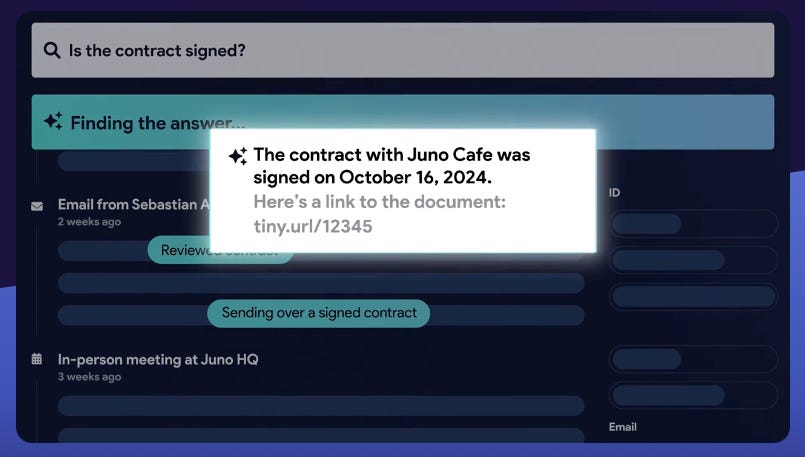
These have been super useful to Streak customers and we’ve been greatly improving the accuracy and functionality of these features. When summarizing information, for example, we provide references to each email, comment, and so on so that customers can verify we’re providing accurate data. I previously wrote about streaming these results back and ensuring that the references provided appear correctly and are fast:

Revenue-minded charges
I remember when I first started working at Streak, I learned about Google Cloud Datastore and its pricing model where they charge some amount per 100K reads. This came up as I was curious about a large customer of ours and how much it would cost us if they reloaded all of their data. Our VP of Engineering did some quick mental math and figured that, if we had no caching, it would be about $6 every time one of their users reloaded Streak.
Of course, this is to be expected with SaaS models: power users stress your systems and push the limits of what your infrastructure can handle, while sometimes costing more than they spend. This motivates better engineering: how can we improve our cache hit ratio, or only load the minimum amount of data required, or work with our data more efficiently?
When it comes to AI spend, much of the cost is unavoidable especially when using a potentially unbounded amount of data supplied by the user. AI providers charge based on the number of tokens consumed. When making a single request and providing all the relevant data up front, you don’t benefit from strategies like summarization since the user may need some precise detail that a summary may omit. If you can’t reduce the amount of data you send in the request, the only other lever that’s easy to pull is choosing a simpler, less capable model instead of the latest flagship one.
Pricing strategies
Inevitably, SaaS providers need to pass on these costs somehow. There are a few strategies:
Eat the cost and burn through investor cash or reserves. This can gain marketshare, but the risk is that your unprofitable business runs out of cash or you need to surprise users later and start charging exorbitant fees to recoup your losses as you struggle to become profitable. Sometimes this works, sometimes it backfires as you alienate customers whose entire business depended on predictable spend and your churn goes up.
100% pay per use. Your base SaaS subscription remains the same price and no AI functionality works until you pay for it. This is the most honest model, but can also alienate customers as the market has shifted towards an expectation that at least some AI functionality is built in.
Raise your SaaS subscription cost to anticipate average use, then allow unlimited AI use. Other than the initial surprise to customers of “hey, why are you charging me more?” this makes the cost predictable to customers. Power AI users benefit from being subsidized by the infrequent AI users. However, the flip side is that infrequent AI users feel ripped off as they don’t realize the value from the increased cost.
Include a reasonable amount of AI use in your existing subscription cost, then charge separately for heavy AI usage. This keeps your base subscription cost unchanged and allows all users to take advantage of AI functionality if they choose. Infrequent AI users benefit since they’re not paying any more and don’t subsidize power AI users. And power AI users get a generous level of AI spend included and are then billed appropriately for the resources they use beyond that.
This isn’t meant to be an exhaustive list, but rather a sample of common approaches that SaaS providers have adopted. As with all things engineering, which one you should choose always gets the “it depends” answer.
Some AI spend is infrequent and involves a small amount of data that you control. An example is when onboarding a new customer, just consider any AI spend as part of your customer acquisition cost. But if your AI use is based on an unbounded volume of data that the customer provides and could result in your company facing unlimited AI spend? You’ll definitely want some sort of usage-based model.
For Streak, we chose option 4. All teams get a generous allocation of AI credits per user which are pooled together for use by anyone on the team. Within this option, there are a few approaches we could’ve taken for handling overages:
Postpaid pay per use - each additional AI use results in some charge on their next bill. This is similar to how cell service providers charge for roaming fees or international long distance calls when those aren’t bundled into your plan’s cost.
Prepaid pay per use - purchase a block of AI credits and additional AI use draws down against the balance. A bit similar to a gift card. Downside of this is that you either automatically top up the balance when the team runs out, or users need to chase their billing admin user to purchase additional credits.
Subscription - purchase a recurring block of AI credits and draw down against this balance each month. This is similar to cell service providers offering roaming data bundles (eg: $X/month for Y GB of roaming data) or international calling (eg: $X/month for Y minutes of long distance to certain countries). Like with cell service providers, this is a use-it-or-lose-it model and the balance resets next month regardless of how little you use. The upside is that it offers cost predictability and encourages people to make use of what they paid for.
We went with approach 3. A subscription keeps spend predictable and encourages use without fear of driving up a monthly bill. And the fact that we record it as recurring revenue is a nice bonus.
Keeping track of credits
The most fundamental part of this is that teams have a bucket of credits they can spend, and once the credits are exhausted they shouldn’t be able to consume any more. Credits may be whole or fractional, and we want to support a cost of 1 credit, 5 credits, 0.1 credits, or even 0.000025 credits. Spending should be accurately reflected and double spending should not be possible. If this sounds like the usual banking examples used in “Transactions 101”, you’re correct.
For this, just about any durable storage system will work: traditional SQL, document store, NoSQL, or anything else you can wrangle to ensure you get the ACID properties necessary.
I wrote up previously about using BigTable to great effect for our threadweaver project:

BigTable is a NoSQL system that provides full ACID compliance, but only for a single row in a cluster. Since we want to track not just a credit balance but also a complete ledger of all use, this could eventually become a high volume system used everywhere throughout Streak. BigTable has been an absolute powerhouse for us and it’s not uncommon that our reads spike during busy periods at over 1 GB/s of data with significant write volume as well.
Designing a BigTable schema
There are essentially two types of data we want to support:
information on the balance and spend for teams
ledger of all credit usage
This maps nicely to two tables: credit_balance and credit_ledger.
I consider BigTable to be a “build your own database kit”. You don’t get any joins, you don’t even get any indexes, and there is no such thing as a transaction. The closest you get to a transaction is that a single row mutation is strongly consistent. When you want to look up some information and that lookup should be fast, you need to know either the full row key or, at the very least, a row key prefix. So this directly informs the design of the schema with the row key being paramount.
Since credits are allocated based on the team’s subscription period (eg: per month), we will be storing one balance row for each month. Given that we use Stripe for managing billing, the natural choice here is the billing cycle anchor, which is the unix timestamp in seconds of the start of the current billing period. Since we will be looking this up by team, the natural choice is that the row key is:
{team key}#{billing cycle anchor}For example, if our team key is agxzfm1haWxmb29 and the billing cycle anchor is 1775861391 then the row key is:
agxzfm1haWxmb29#1775861391To make use of this, we could simply load in every row with a prefix of {team key}# and identify which one has the latest timestamp, but we might as well store a simple lookup for this using the row key of:
{team key}#latestThis makes it simple: for our example team, we lookup agxzfm1haWxmb29#latest, and a qualifier (equivalent of a column) called “reference” will contain a pointer to the current billing period’s row key of agxzfm1haWxmb29#1775861391.
The information we need to store is quite simple: total credits, credits consumed, and any bonus credits. We end up with the following qualifiers for the credit_balance table:
reference: used only for the
#latestrow, contains the row key for the current billing period.total_credits: the number of included credits their team has (based on paid user count and plan level).
credits_consumed: the total amount of credits their team has used.
bonus_credits: any bonus credits we may grant the team.
For any paid add-on credits, we have similar row keys:
{team key}#addon#latest
{team key}#addon#{billing cycle anchor}
The same lookup logic applies there, and the only qualifier used is total_credits to indicate how many add-on credits their team receives. The credit consumption is deducted from the main balance row’s credits_consumed qualifier.
For the credit_ledger table, we’ll be storing individual consumption records as well as records of any refunds issued. This allows us to issue individual credit refunds if there was a glitch or if a user gets a particularly bad result. We autogenerate our credit consumption IDs which look like crd_CyJVjssenrH8Qg5Mxg which combines a timestamp-based prefix with a random character suffix. Since we’re storing them for teams, we end up with the following row keys:
{team key}#{credit consumption id}
{team key}#{credit consumption id}#refund
When refunding, we sometimes start out with only the crd_* value without knowing the team key prefix, so we need a fast way to resolve this back to the full row key. Recall earlier that BigTable doesn’t have indexes and we want to avoid a complete table scan just to find the one row that ends with the #crd_* value. So we write a separate row with the reverse lookup:
{last 2 characters of credit consumption id}#{credit consumption id}The value in this row is the full row key in {team key}#{credit consumption id} format which we can use to fetch directly.
The qualifiers used are:
operation: either CONSUME or REFUND
user_key: which user performed the action
anchor_row: which row key in the
credit_balancetable this credit was used in. When refunding, we use this to credit back to the original billing period.usage_type: identifies which feature consumed the credit (eg: summarization, Q&A, etc.)
credit_amount: how many credits were consumed (negative for refunds)
timestamp: milliseconds since unix epoch
consumption_row_key: used only for reverse index lookups
Avoiding tablet contention
Why prefix this with the last 2 characters? Recall that the crd_* value has a timestamp-based prefix. The way BigTable stores information is in separate tablets. Row keys which have the same prefix end up being stored on the same tablet. This makes writes unevenly distributed, potentially creating a hotspot. For example, generating a bunch of IDs in a row:
crd_C124alRwsOudGAPxaA
crd_C124alR5-d7sqrbV_Q
crd_C124alR4uF65SCSjMg
crd_C124alR4-JlcKlsZrg
crd_C124alRWlrhueqY6kQ
crd_C124alRmpmnx3ie8rQ
crd_C124alRtrb_a8o9RMw
Since these all have a common prefix of crd_C124alR they all end up on the same tablet, which may kill performance when the system is busy. Instead, we end up writing:
aA#crd_C124alRwsOudGAPxaA
_Q#crd_C124alR5-d7sqrbV_Q
Mg#crd_C124alR4uF65SCSjMg
rg#crd_C124alR4-JlcKlsZrg
kQ#crd_C124alRWlrhueqY6kQ
rQ#crd_C124alRmpmnx3ie8rQ
Mw#crd_C124alRtrb_a8o9RMw
BigTable is then able to write these in parallel across multiple independent tablets, preventing a hotspot. For the actual credit row itself, we’re already prefixing by team key, so different teams already naturally land on different tablets.
If you’ve done this correctly, the Key Visualizer tool in BigTable should look like this:

When you have a sufficient volume of data across a broad range of users, operations across all rows should be evenly distributed. The darker the heatmap is, the better. Areas of orange, yellow, or white indicate potential bottlenecks.
Rolling our own transactions
Recall that BigTable doesn’t offer transactions. Adding new entries to the ledger is trivial: it’s always a new row. But we also want to ensure we properly update the balance row when making changes to either the credits_consumed or the bonus_credits qualifiers.
If we were using long values here, the change would be simple. BigTable’s row mutations support an increment operation. Let’s focus on the credits_consumed qualifier (the same is true for bonus_credits). In Kotlin, that operation would look like:
ReadModifyWriteRow.create(tableId, rowKey)
    .increment(familyName, "credits_consumed", amount)
This would atomically increment the current value of the credits_consumed qualifier by the amount specified. However, it only works for long values. Since we support arbitrary fractional values that are using a double data type, we need to go with a different approach.
🚧 Practical engineering note
I could’ve used a long data type and expressed the cost in microcredits, so if something has a cost of 1 credit, we store it as 1_000_000 microcredits instead. We had already specified all costs using a Kotlin Double data type, so some are 1.0 and another is 0.1 and it was simple enough to maintain that through to the data storage layer.
In retrospect, microcredits would have been the better design. We’re unlikely to ever need to express greater precision than that, since 1 microcredit is already a tiny 0.000001 credits. One minor drawback is that it makes for slightly less obvious values as we now need to convert every value used everywhere into microcredits. If a team has N credits per user included with their plan, that needs to be N * 1_000_000 microcredits, and something costing half a credit needs to be expressed as 500_000 microcredits.
In this case, we’ve made the trade-off for simplicity of human-understandable values everywhere at the expense of slightly more complex updates and rounding out any precision loss when dealing with fractional credits (eg: the canonical example of 0.1 + 0.2 = 0.30000000000000004) where rounding to one decimal place is fine. The client gets JSON responses that look like:
{
  "creditsConsumed": 94.0
}
Rather than:
{
  "microCreditsConsumed": 94000000
}
and having to perform all that conversion again. Or keep inputs/outputs as double, accept any rounding, but convert to microcredits as a long value at the data storage boundary where we could make use of atomic .increment operations for fire-and-forget updating.
Even better, in the last few years BigTable introduced support for Aggregate column families which support a sum operation. How does this differ than just calling .increment as shown earlier? The increment operation may timeout at the network layer. Did it succeed? Who knows… you didn’t get a response from the server because of network issues. If you don’t retry and the increment didn’t apply, you fail to record some spend. If you do retry and the increment already applied, you end up double spending. Admittedly, it’s typically a rare case but aggregate column families solve this via CRDTs (Conflict-free Replicated Data Types). It does this via passing an idempotency key (an arbitrary long value) which is used for the cell timestamp and functions as a deduping mechanism. By providing the same cell timestamp, you always end up writing to the same individual cell, so any retry operation is safe as long as it happens within your column family’s age-based garbage collection policy. For example, you could set that policy to 2 hours:
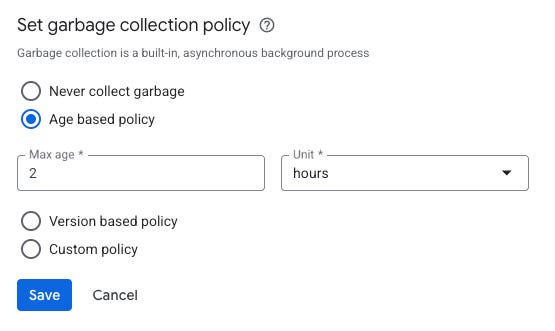
This means that you could record the data 1000 times within 2 hours and, as long as the cell timestamp (the idempotency key) is identical, it will end up being counted exactly once. Behind the scenes, BigTable performs garbage collection and compaction and eventually reduces all cells down to a single value.
Alas, when I implemented this I wasn’t aware that aggregate column families were a thing, and rolling our own transactions on top of BigTable was the workaround to the potential problems a blind .increment has. I call this the “hammer problem” — you need to implement something, so you reach for the hammer you know. In this case, the hammer was perfectly fine and I was comfortable with its idiosyncrasies but I was unaware there was a newer, more efficient hammer which avoids the issues the old hammer has.
Could I rewrite the code to use this instead? Absolutely, and doing so would be simple. However, it’s important to not conflate simple with easy. Since this is an active system, both versions need to work at the same time, processing requests from a pool of servers which are running both the old and new code. We would need to migrate all the data over while servers process in-flight requests, validate everything is consistent, retire the old version, and so on.
Should we do this? Logs show that with our transaction system, we’ve seen updates use at most one retry to record an atomic spend so the impact is minimal. Given this and the volume of work the change would entail, we decided to defer this work. There’s effectively no user-facing impact and there are bigger fish to fry. If the impact changes, we can always revisit this and do the work later. The cost of waiting is that the data migration volume becomes larger, but such is the nature of practical engineering. 🔨🐟
Okay, so back to rolling our own transactions. Many databases that do offer transactions implement this via optimistic concurrency, where the entire transaction retries on conflict. For example:
Google Cloud Datastore
FoundationDB
CockroachDB
TiKV
Spanner
Other systems provide the mechanism to implement this yourself. You’ll typically see this with object/document stores as:
fetch object with version number (or etag, or generation, or…)
make a change and update the object, supplying the version you fetched
if the version matches, update succeeds
if there’s a version mismatch, go back to step 1 and retry everything
BigTable is like this so we’ll use the same standard CAS (compare and swap) to implement atomic updates. Let’s say that a team has consumed 100 credits and we want to record another consumption of just 1 credit. Behind the scenes, we perform what’s known as a conditional mutation:
val conditionalMutation =
    ConditionalRowMutation.create(balance.table, anchorRowKey.value)
        .condition(
            Filters.FILTERS.chain()
                .filter(Filters.FILTERS.limit().cellsPerColumn(1))
                .filter(Filters.FILTERS.family().exactMatch(balance.columnFamily))
                .filter(Filters.FILTERS.qualifier().exactMatch(B_CREDITS_CONSUMED_QUALIFIER))
                .filter(Filters.FILTERS.value().exactMatch(getByteStringFromDouble(currentCreditsConsumed))))
        .then(
            Mutation.create()
                .setCell(
                    balance.columnFamily, ByteString.copyFromUtf8(B_CREDITS_CONSUMED_QUALIFIER), getByteStringFromDouble(newCreditsConsumed)))

val valueSet = client.checkAndMutateRow(conditionalMutation)

if (!valueSet) {
    throw TeamCreditsConcurrentModificationException(teamKey)
}
The TL;DR is that updating the number of credits consumed to the new value only succeeds if the current value matches currentCreditsConsumed. But where do we get that value? It looks something like this (simplified to :
retryWithBackoff {
    val details = getCreditDetails(teamKey)
    consumeCredits(teamKey, details.currentCreditsConsumed, amount)
}
With this, if two independent requests running on different servers attempt to consume 1 credit when the team’s consumption is 100, they may both fetch a current value of 100, only one will succeed and match the condition that the value is 100; the other request will mismatch as the other request updated the value to 101. This triggers a retry, where it refetches the current value, gets back 101, then succeeds.
Testing correctness
This is pretty simple to test. I wrote a test that fires up 200 Kotlin coroutines in parallel and each one attempts to consume a single credit against the same balance row. We see a slew of TeamCreditsConcurrentModificationException being thrown, each coroutine retries, and ultimately all 200 succeed. The test then fetches the current balance and sees that all 200 credits were consumed successfully, there are 200 ledger entries, and all the balances are fully consistent.
Banking-grade accounting or best effort?
My initial approach to this was to default to a model where the credits are spent up front and, if there’s an error, they are refunded. This works well and ensures that a team with a remaining balance of only 1 credit can only spend 1 credit.
In theory, this yields fairly simple code, akin to:
val creditConsumptionId = consumeCredits(teamKey, amount)

try {
    // do the work
} catch (e: Exception) {
    refundCredit(creditConsumptionId)
}
After all, if there was a transient error on your side that prevented them from getting the value they just spent the credits for, then you should absolutely refund them so they can try again later.
But the code isn’t quite as nice and linear as that. Some processes span multiple asynchronous tasks behind the scenes. This would mean that if we consume all the credits up front, we need to pass those individual creditConsumptionId values to every task and, if any one fails, we need to determine whether we can retry the failure or whether it’s permanent and refund the credit at the appropriate time.
This is a solved problem and it involves a bunch of annoying grunt work that must be done correctly. If we were a finance application, we’d absolutely put in the effort to use idempotency keys everywhere, implement a reserve-then-settle model, have background processes to release orphaned reservations that don’t settle within some defined TTL, and so on. However, we made the conscious decision to simplify the architecture considerably. What we ended up with is this process:
check to see if a team has sufficient credits up front but don’t consume yet
if they don’t, abort with an appropriate error message to the client
enqueue whatever task(s) we need to perform the work
when each task runs, it performs the work without checking any credits
only if the work succeeds, record the credit consumption and exit with success
There’s a small risk where an overspend is allowed. Let’s say a team has only 10 credits remaining and two users simultaneously perform an autofill on 10 fields (at 1 credit each), they’ll both hit the check that the team has enough credits, and both will succeed. We then do the work, and at the end the team will have a balance of -10 credits.1
Not the end of the world. When a team consumes more credits than they’ve been granted, we consider this worthy of investigation. Should it appear that a team is intentionally abusing this, we can send them a polite email asking them to reconsider their choices. The worst case is we did some work and burned through a bunch of AI tokens which we eat the cost for. An acceptable risk for a much simpler architecture.
Tying this into Stripe
We’ve chosen Stripe as our source of truth for how many credits a team receives, when they receive them, and when changes need to be made to any balances on our end.
The key objects in Stripe are:
Subscription
we tie the team to this
billing_cycle_anchorindicates the timestamp of the start of the present billing month (or year for annual subscribers)if the team has subscribed to additional credits, we store “high water mark” values for the current billing period:
the maximum number of additional credits the team purchased
the highest amount paid
the billing cycle anchor for these high water mark values
Price
indicates which specific plan the team has (for example: our main subscription product has one price for Pro, one for Pro+, one for Enterprise)
different prices for monthly vs yearly billing
each price contains metadata indicating the number of credits we grant per user
We already have a webhook registered for any subscription changes. A subscription may change as a result of modifying the number of paid users or switching to a different plan. Regardless of the change, we process the data in the subscription and reinitialize what we store locally:
given the metadata in the price for their main subscription as well as how many paid users, calculate how many credits the team should be granted
store this in the total_credits qualifier for the team’s balance for the subscription’s billing cycle anchor
if we created a new row, update the
{team key}#latestrow to point to the new billing cycle anchor
That’s all there is to updating the main subscription.
Add-on credits
As I mentioned above, we allow teams to subscribe for additional credits that their team can use. When the user upgrades from one add-on credit plan to one which offers additional tokens, we want to charge them the difference in price and grant them the additional tokens immediately. If the user downgrades, that downgrade takes effect on the next billing cycle and they still get to enjoy their current token level for the remainder of the period.
This makes use of the high water mark metadata on their Stripe subscription. We then use this to calculate the effective number of add-on credits they have:
val effectiveAddOnCredits = max(addOnCredits, highWaterMarkAddOnCredits)This information is stored in separate rows with keys:
{team key}#addon#{billing cycle anchor}
{team key}#addon#latest
The amount of add-on credits is stored in the total_credits qualifier similar to the regular team credits. We implemented it separately rather than have just an addon_credits qualifier so that we could allow different billing periods for the add-on credit plans from their main Streak subscription.
Lazy initialization
We’ll get a Stripe webhook for teams when their subscription renews. However, since we launched these credits there are some teams (especially annual subscribers) where we haven’t yet received the webhook from Stripe so we have no rows in BigTable for their team. When this situation is detected, we simply call Stripe, fetch all the data, and reinitialize our local data just as if we had received a webhook. There’s never a code path where we want to consume credits, or check a balance where we don’t end up with the correct data.
Fixing the bugs
Even if your code is flawless, in the real world it may rely on assumptions that aren’t always true. For example, in Streak users may belong to more than one team: a main paid team with all their team members, plus a private unpaid team. When we went to initialize the credits for the unpaid team, we looked up the data in Stripe, found no corresponding record, so we just returned a dummy record showing they had zero credits. But every time afterwards when we queried this team, we hit up Stripe again, adding latency. The fix? Store a balance record with the billing cycle anchor at timestamp=0 (the unix epoch) with total_credits of 0. Problem solved. And should that user’s personal team ever become paid, the Stripe webhook handler records a new record with the current billing cycle anchor and correctly syncs everything.
Wrapping things up
In a nutshell, implementing paid credits is straightforward:
Figure out how you want to charge for it. One size doesn’t fit all, so choose which billing model makes sense for you and your users. Mix and match.
Choose your data storage (anything that offers ACID compliance) and construct a schema.
Ensure you account for any basic performance issues in your data storage, like avoiding hot tablets in BigTable, or creating appropriate indexes for SQL.
Choose how “correct” you want to be: somewhere between NASA-level / banking grade engineering and best effort. Be aware of the magnitudes difference in engineering effort different correctness levels entail.
For example: if a Stripe subscription webhook arrives five minutes late, a team’s credit renewal will be delayed and any spend during that interval would be logged against the prior month. Does it really matter? I’m sure most teams aren’t thinking “hey, I signed up five months ago at 4:27 PM, and my credits didn’t renew until 4:32 PM!” Pick your battles.
Identify the lifecycle of your credits. Ensure all credit initialization is triggered from the appropriate source of truth and initialize lazily on demand.
Test! Not just your UI and API. Write comprehensive tests in code to exercise your credit system. Your credit accounting should be perfect with the balance perfectly matching the ledger.
If you choose best effort with eventual consistency, you may allow limited overspending, but you must perfectly record the overspending.
Launch internally, then roll out externally. You’ll inevitably find some sharp edges in your implementation by having internal users hammer on things.
Engineering at Streak
We work on many interesting challenges affecting billions of requests daily involving many terabytes of data. For more information, visit https://www.streak.com/careers
There are ways to mitigate this, of course. For example, you could track in-flight spent via a Redis cache entry with a short TTL, then expire the entry when durably recording the spend, or any number of other approaches. Whether you need such mitigations is a judgment call for your situation. If it’s not crucial, consider shipping without it as you can always monitor how your system works in practice and do the work later if warranted.